

In short
- CNC milling produces the positive model you thermoform on; 3D printing builds the device itself.
- What you produce, the space you have and who will run the system matter more than the price of the machine.
- At the end you will find 12 questions to ask any supplier, including us.
This guide is for people who run or work in an orthopedic lab that still works with plaster, or sends its positive models out to be milled, and is thinking about moving production to digital. It does not start from the machines but from the questions to ask first: what you produce, how much space you have, who will use the system, what happens when it stops.
One note, for transparency: Satres builds both CNC milling machines and a 3D printer for orthopedics. That is why we can also tell you when one of the two is not the right choice for your lab.
1. Before the machine: what you produce and how much
The first choice is not a technical one. Take the devices you made last year and split them into three groups: the ones you make in-house, the ones you send out, and the ones you turn down because you lack the time or the equipment. The right system is the one that covers the first two groups without forcing you to change everything else.
In a digital lab the work always follows the same thread:
- Scanning the patient with a 3D scanner, instead of taking a plaster cast.
- Modelling the shape on the computer with CAD software.
- Preparing the job with CAM software.
- Production: the milling machine carves a positive model, the 3D printer builds the device.
- Finishing: thermoforming on the milled positive, or finishing the printed part.
The table gives a first idea of which technology to use for what.
| Device | CNC milling | 3D printing |
|---|---|---|
| Spinal braces and body jackets | polyurethane positive, then thermoforming | brace printed directly |
| AFO and KAFO | polyurethane positive, with the fourth axis | AFO printed directly |
| Prosthetic sockets | polyurethane positive | socket printed directly |
| Insoles | milled positive | insole printed in TPU |
| Cosmetic leg and calf covers | yes | — |
| Shoe lasts | yes | — |
| Cranial helmets | polyurethane positive | helmet printed directly |
2. CNC milling or 3D printing: two different paths
The two technologies are often compared as if they did the same thing. They do not: what comes out of the machine is different, and so is the work that is left to do afterwards.
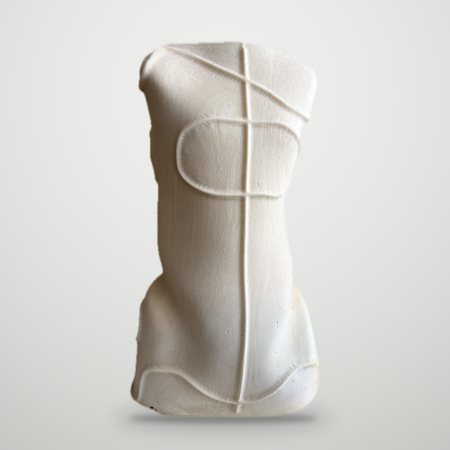
Milling produces a positive model
The milling machine works a block of polyurethane foam and carves out the patient’s positive, the same one you used to get from plaster. From there the lab carries on as it always has: thermoforming, trimming, finishing. It is the most natural step for a lab that already has an oven, a thermoforming station and experienced technicians, because it replaces the slowest and messiest part of the process without touching the rest.
Orthopedic milling machines dry-machine polyurethane foams up to 800 kg/m³, as well as wood, resin and soft foam. A body jacket positive takes about 15-20 minutes on the ORTHO 1004 EVO and about an hour on the OCM.
3D printing builds the device
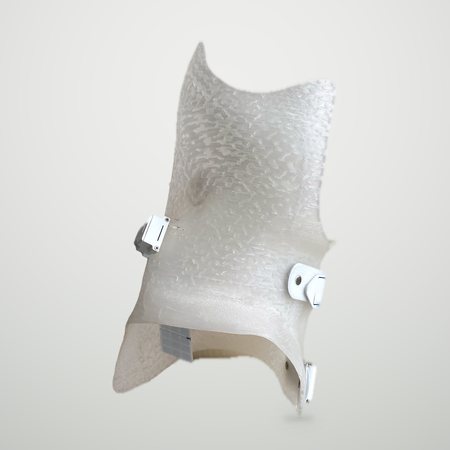
The printer does not produce a model: it builds the brace, the orthosis or the insole directly, layer by layer, in polypropylene, TPU or PETG. Thermoforming disappears, and with it a large part of the manual work. In exchange the machine runs much longer: on the Helios HS a brace takes 6-10 hours, which in practice means printing overnight and finishing in the morning.
| CNC milling | 3D printing | |
|---|---|---|
| What comes out of the machine | the polyurethane positive | the almost finished device |
| After the machine | thermoforming, trimming, finishing | finishing |
| Machine time for a brace | minutes | hours |
| Technician’s work | thermoforming remains | reduced: no thermoforming |
| Consumables | polyurethane blocks and thermoforming sheets | polypropylene, TPU or PETG filament |
| Equipment you still need | oven and thermoforming station | finishing tools |
What about costs?
Both the materials and the time change. In the estimates of our calculator, printing removes about an hour and a half of thermoforming for a brace, but keeps the machine busy for hours instead of minutes. Which path pays off depends on your staff’s hourly cost, the price of materials and how many parts you make. There is no answer that fits everyone, and it is better to run the numbers on your own figures.
Over time, many labs end up using both: milling for the devices that have always been thermoformed, printing for those where cutting out steps pays off.
In short: which Satres machine for which workshop
- OCM, if you are going digital and mostly make body jackets, but also lower-limb sockets and insole positives. Compact, runs on 220 V.
- ORTHO 1004 EVO, if you make a bit of everything, in volume: faster body jackets, AFOs and KAFOs, helmets, leg-foot models, cosmetic covers and shoe lasts, with the fourth-axis accessories.
- Helios HS, if you want to eliminate thermoforming: corsets, AFOs, sockets, insoles, cushions and seating printed directly.
Already have an idea? Calculate your savings or book a free demo.
3. If you choose milling: how many axes?
More axes mean more freedom of movement for the tool around the block, and therefore more complex shapes. A 3-axis milling machine is enough for body jackets, lower-limb sockets and insole positives, and it is the simplest and most affordable configuration. The fourth axis allows geometries that cannot be done on 3 axes: it is what you need for AFOs and KAFOs.
Block size
Every milling machine has a limit on the part it can machine, and that limit sets the largest device you can make. The OCM machines blocks up to 500 mm in diameter by 660 mm in length; the ORTHO 1004 EVO up to 650 mm in diameter by 1100 mm.
General-purpose or orthopedic milling machine
A milling machine built for prototyping or woodworking can cut polyurethane, but it is not designed for an orthopedic lab. You notice the difference in everyday work:
- block change: a quick-clamping system, such as OrthoBLOCK on the ORTHO 1004 EVO, cuts idle time between one part and the next;
- programming: ready-made jobs with roughing and finishing parameters already set, instead of starting from scratch for every part;
- dust: built-in extraction and collection tray, because milled polyurethane produces a lot of it;
- footprint: a machine that fits through the doors of your lab.
Robots with 5 or more axes make sense for very high volumes or very large parts, but they need more space and a bigger investment.
Everything about milling machines, axes, times and software is in the guide to CNC machines for orthopedics.
4. If you choose 3D printing: what to look for
- Build volume. An adult brace is a large part, and it has to be printed in one piece. The Helios HS prints up to 600 × 600 × 800 mm.
- Time per part. What counts is the time for a real device, not the top speed on the data sheet. Ask how long a brace takes: on the Helios HS, 6-10 hours.
- Materials. Devices need materials suited to medical use, and a dryer that keeps the filament dry.
- Extruders. More extruders let you combine different materials in the same print, for example polypropylene and TPU. The Helios HS takes up to four.
- Long prints. A ten-hour print has to survive a power cut: look for automatic resume after a blackout.
- Software. Ask how much manual work it takes to prepare each device for printing.
For more on devices, materials and print times, read the guide to 3D printing for orthopedics.
5. Space, dust and power supply
Before choosing, measure the room and the doors. Orthopedic machines are designed to sit in a lab, not in a factory hall, but the differences are real:
| OCM | ORTHO 1004 EVO | Helios HS | |
|---|---|---|---|
| Floor space | 800 × 1200 mm | 837 × 2103 mm | 1300 × 950 mm |
| Height | 1000 mm | 2018 mm | 1500 mm |
| Weight | 250 kg | 700 kg | 250 kg |
| Voltage | 220 V | 380 V (220 V optional) | 220 V |
| Installed power | 3 kW | 6 kW (3 kW on request) | 2.5 kW |
The ORTHO 1004 EVO is less than 850 mm wide and has wheels: it goes through a standard door. OCM runs on 220 V; ORTHO 1004 EVO runs on 380 V, and is also available at 220 V for labs without a three-phase supply.
Think about the environment too. Milling polyurethane produces dust and noise: you need extraction and an area away from the rooms where you see patients. 3D printing makes no dust, but it works best in a room with a stable temperature.
6. Software: from scan to part
The machine is only the last link. Before it come the scanner, the CAD software you model the shape with, and the CAM software that turns the model into a program for the machine.
Do you need to know how to program?
You should not have to. On a milling machine designed for orthopedics, programming happens at the machine, with guided procedures and ready-made jobs. On Satres machines this is done by OrthoCAM and the OrthoLIB library, with a simulation of the tool path and a collision check before starting.
Is the system open?
This is the most important question in this section. A closed system ties you to a single modelling software for good. Check that the machine accepts STL files from any CAD: OrthoCAM does, so you can keep using the software you already know.
Also ask where the files end up. Every scanned patient becomes a digital archive: to make the same brace again you only need the file, not a new cast.
7. Training, support and downtime
A machine that stops is a lab that does not deliver. Before looking at the price, it is worth understanding what happens after the purchase.
- Training. On a system designed for orthopedics a few days are enough: our training takes one or two days, and the tutorials remain available on the training and assistance page.
- Support. Ask how quickly the supplier responds, and how. When a Satres machine stops, we respond the same day; on the milling machines a built-in camera also lets you see the machine at work remotely.
- Warranty. Read what it covers and how long it lasts. Our machines come with a one-year warranty, which can be extended.
- Experience. Ask how many labs already use that system. Satres has worked in orthopedics since 2019, and today some forty labs produce with one of its machines.
8. Costs, return and incentives
The price of the machine is only part of the calculation. To compare two offers properly, list every item:
- the machine and its configuration;
- scanner and CAD software, if you do not have them yet;
- training and installation;
- consumables: polyurethane blocks and sheets, or filament;
- maintenance and energy;
- warranty extension.
On the other side are the working hours you save, the plaster and its disposal you no longer pay for, and the parts you stop sending out. The return on the investment depends on these figures, and they are different for every lab.
The quickest way to get an idea is the ROI calculator: enter your lab’s data and see how long it takes for the investment to pay back and how much you save in a year. At the end of the simulation, if you leave your email, you also receive an indicative price for the machine.
Tax incentives
Many countries support investment in new production equipment through tax relief or grants, and the rules change often. In Italy, for example, companies buying new machines in 2026 can use the iperammortamento, which raises the value of the machine for tax purposes. Before you order, ask your tax advisor what applies in your country.
9. 12 questions to ask a supplier
Take them to your meeting with any supplier, including us. A vague answer is information too.
- Which devices can I produce, and up to what size?
- How many axes does the machine have, and what can I not do with this configuration?
- Which materials does it machine, and at what densities?
- How much space does it need, and does it fit through my doors?
- How are dust and noise handled?
- Which software is included, and does it accept STL files from other CAD?
- Do I need a CAM programmer, or is it all done at the machine?
- How many days of training are included, and where?
- If the machine stops, how quickly do you respond, and how?
- Can I see real parts made by a lab like mine?
- What is the total cost over the first three years, not just the machine?
- Can I run a test with my own files before buying?
See real parts
Data sheets and videos show the machine; parts from a lab show the result. On the work made with Satres machines page you will find body jackets, a Lisfranc amputation prosthesis, carbon insoles and an orthosis made by Ortopedia Primo Cecilia with the ORTHO 1004 EVO.
To find your way among the models, start from the machines for orthopedics, or go straight to the OCM, the ORTHO 1004 EVO and the Helios HS.
Guide updated September 2026. Technical data and processing times refer to Satres machines; incentives depend on the rules in force in each country.
Bring these questions to us
Tell us which devices you produce and how many parts you make a month: we will answer point by point and arrange a free demo. For the Helios HS we can also run a test print with your files.